Patgum: A Creative Toolkit for Modern Presentations
When you're building a presentation, the goal is clear communication. You want your ideas to land, your data to be understood, and your audience to stay engaged. But too often, the tools we use fight against us. We spend hours wrestling with inconsistent layouts, hunting for the right font, or trying to make generic templates look like our own. The Patgum - Creative Powerpoint Templates collection is built to solve that friction. It's not just a set of slides; it's a structured design system for anyone who needs to present ideas with clarity and visual polish.
A Foundation of Flexibility and Professionalism
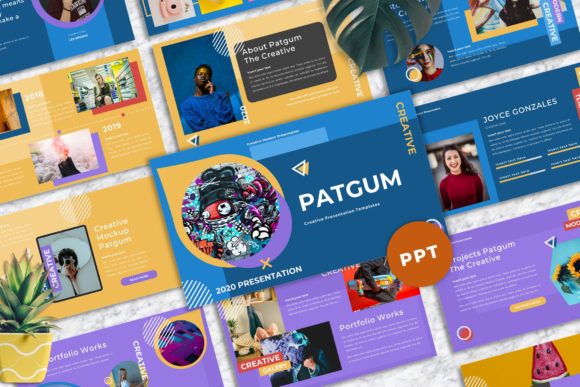
At its core, Patgum provides 40 master slide layouts. Think of these as the foundational building blocks. Each master slide is a carefully considered framework, designed with strong attention to detail, professional typography, and a clear visual hierarchy. This means you're not starting from a blank canvas or a cluttered, over-designed template. You're starting from a place of solid design principles. The 16:9 widescreen ratio is standard for modern displays, ensuring your presentation looks sharp in any boardroom or on any webinar screen. The real power, however, lies in the editability. Every graphic is vector-based and resizable without losing quality. Every element uses a picture placeholder and a drag-and-drop image system, so swapping in your own photography or brand assets is intuitive. The promise of easy color change is critical for maintaining your brand identity. With a few clicks, you can adjust the entire palette to match your company's guidelines, transforming the template's personality to fit your specific context.
Designed for Real-World Scenarios
Where does a toolkit like this actually fit? The versatility is its standout feature. For a creative studio or agency, Patgum offers a polished way to present client work, project timelines, or strategic proposals. The unique mockup device slides are particularly useful for showcasing app designs, website layouts, or digital campaigns in a realistic context. For entrepreneurs and small business owners, it's a professional asset for investor pitches, internal team updates, or marketing plans. The clean layouts help distill complex information into digestible points. Marketers and content creators can leverage it for campaign post-mortems, content calendars, or partnership decks. Even for personal portfolios—whether you're a photographer, writer, or consultant—the template's focus on typography and usability provides a sophisticated frame for your work. It elevates the content without distracting from it.
Practical Considerations for Getting Started
Choosing a presentation template is a practical decision. First, evaluate the visual style against your project's needs. Patgum's design leans towards a modern, clean aesthetic with a strong focus on usability. Does that align with the tone of your message? For a formal corporate report, its professionalism is an asset. For a playful, avant-garde art portfolio, you might need to customize the color scheme and imagery heavily to shift the mood. The included free web fonts are a smart choice, ensuring readability and consistency across different machines. The documentation file, which details these fonts and the setup process, is essential reading. Before committing to your entire presentation, test the templates with your actual content. Drop in a few of your key images and a block of your typical text. Does the layout still breathe? Is the visual hierarchy clear? This quick test is more valuable than any feature list.
Remember, the drag and drop functionality is a starting point, not an endpoint. The true value of Patgum - Creative Powerpoint Templates is unlocked when you use it as a foundation, not a cage. Adjust the master slides to create new layouts that serve your specific narrative. Pair the included fonts with others from your brand's font pairing guidelines if needed. Use the vector icons as a starting point for your own visual language. The goal is to leverage these design assets to create a presentation that feels authentically yours, saving you time on the foundational design so you can focus on the story you need to tell. It’s a practical tool for professionals who value both efficiency and quality in their communication.