Bookmark Bundle: 8 Templates for Creative Projects
Welcome to Stacy’s Digital Designs! If you’ve ever spent hours trying to design a simple yet effective bookmark from scratch, you know the frustration. The alignment is off, the shape doesn’t look right, and the hole for the tassel ends up crooked. That is exactly why I created the Bookmark Bundle - 8 Bookmark Templates. This collection isn't just about having a shape; it’s about having a professional foundation for your creative projects, whether you are a small business owner looking to create branded freebies or a crafter making personalized gifts.
The Anatomy of a Perfect Bookmark Template
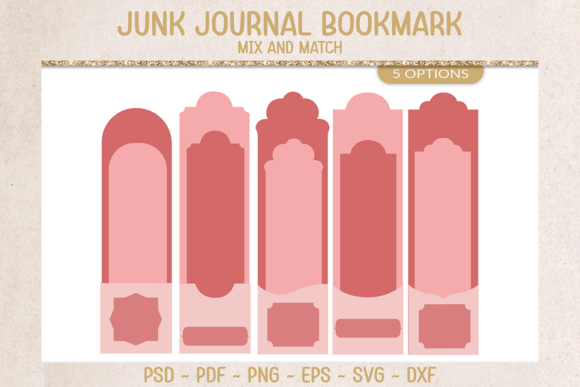
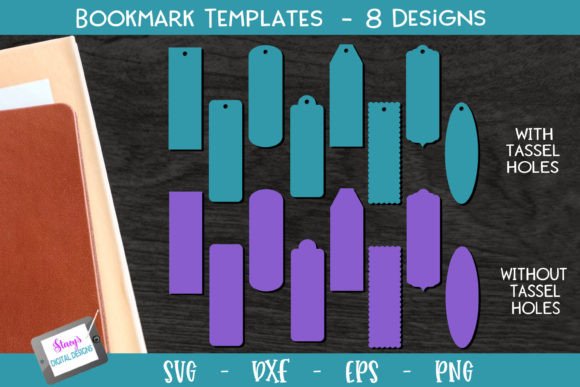
Let’s look at what actually comes in this bundle because versatility is the key here. You aren't just getting one generic rectangle. You are getting 8 distinct bookmark shapes, ranging from classic rounded corners to more intricate designs. The real value, however, lies in the flexibility. Each shape comes in two variations: one with a pre-cut tassel hole and one without. This brings the total to 16 individual templates.
I know that different projects require different workflows. That’s why the download includes a comprehensive zip folder containing SVG, EPS, PNG, and DXF files. This ensures compatibility with almost any software you use, from Adobe Illustrator to Canva, and hardware like Cricut or Silhouette machines. I’ve also organized the files to make your life easier. If you are working with the PNGs for a quick digital mockup, you’ll notice a color-coding system: teal PNGs represent the versions with holes, and purple PNGs represent the versions without. It’s a small detail, but it saves you from opening the wrong file halfway through your design process.
Real-World Applications for Entrepreneurs and Crafters
As a designer or business owner, your goal is to create brand identity and engagement. These templates serve as a blank canvas for that. Think beyond just marking a page in a book. Here is how different audiences can leverage this bundle:
- Authors and Publishers: If you are self-publishing, a high-quality bookmark is the perfect "leave-behind" for book signings or library events. It reinforces your brand identity and keeps your book cover in the reader's mind.
- Small Business Owners: Use these shapes as hang tags for products. The version with the hole is perfect for tying onto a jar of homemade jam, a candle, or a piece of jewelry. It adds a layer of packaging design professionalism that generic tags lack.
- Content Creators and Bloggers: Create physical mailers for your top-tier Patreon subscribers or giveaway winners. A tangible item often feels more valuable than digital content alone.
- Crafters and Hobbyists: For those using cutting machines, having pre-made SVG and DXF files eliminates the headache of manual tracing. You can focus on the creative aspect—choosing the paper, the embellishments, and the sentiment.
Influencing Visual Hierarchy and Professionalism
In graphic design, the foundation of your asset dictates the final result. When you start with a poorly constructed file—one with jagged edges or low resolution—it limits how professional the final product can look. By using clean vector files (SVG and EPS), you ensure that your bookmark templates can be scaled to any size without losing quality. This is crucial for maintaining visual hierarchy.
When you combine these templates with the right font pairing, you control the viewer's attention. For example, if you are designing a bookmark for a vintage bookstore, you might pair the template with a serif font for the main text and a script font for the accent. If you are designing for a modern tech startup, a clean sans serif font works best. The template provides the structure; your typography provides the voice.
Evaluating Fit and File Types
Choosing the right file format is just as important as the design itself. If you are a digital designer working in Photoshop, the PNG files with transparent backgrounds are your best friends. They allow you to drop the shape onto any background immediately. However, if you are sending these files to a professional printer or cutting machine, you should opt for the vector files (EPS or SVG). These files contain mathematical data rather than pixels, ensuring that the curves of your bookmark remain sharp and precise.
I recommend downloading the bundle and doing a quick audit of the shapes. Lay them out on your screen. Do the rounded corners fit a playful brand? Does the sharp rectangular shape fit a corporate legal firm? Matching the geometry of the template to the personality of your project is the first step in effective editorial design.
Designing for Engagement
A bookmark is a small space, which means every millimeter counts. This constraint forces you to practice good design principles. You have to be selective about what information goes on the front and what goes on the back. This bundle encourages you to think about readability. Because the templates are clearly defined, you can easily map out "safe zones" for your text, ensuring that nothing gets cut off during the printing or cutting process.
Furthermore, using these templates helps with consistency. If you are running a marketing campaign that involves multiple physical touchpoints, using the same shape across all materials creates a cohesive look. A bookmark, a loyalty card, and a product tag can all share similar dimensions and curves, creating a unified system of design assets.
Final Thoughts on Utility
The Bookmark Bundle - 8 Bookmark Templates was designed to remove the technical barriers so you can focus on the creative expression. Whether you are using a premium font you just purchased or a standard system font, these shapes provide the perfect container for your message. They bridge the gap between a digital idea and a physical product, giving you the flexibility to create anything from a simple reading aid to a complex piece of branded merchandise.